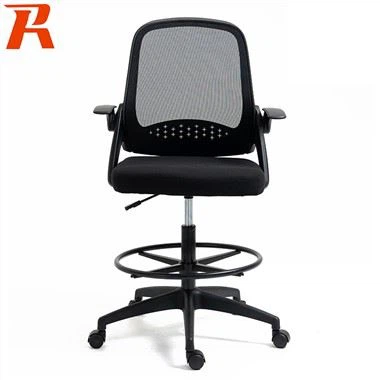
What Are the Most Important Adjustments for an Ergonomic Computer Chair?
Mar 04, 2025
Correct Usage of Computer Chairs
Correct usage of computer chairs begins with understanding the importance of ergonomics. An ergonomically designed chair supports the natural curves of your spine, promotes good posture, and reduces strain on your body. This is crucial for maintaining comfort and productivity during long hours of computer work. By investing in a high-quality, ergonomically designed chair, you can significantly reduce the risk of developing musculoskeletal disorders such as carpal tunnel syndrome, neck pain, and lower back pain.
One of the key aspects of correct usage is adjusting the chair to fit your body. This includes adjusting the seat height so that your feet rest flat on the floor, the backrest angle to support your spine, and the armrests to maintain proper shoulder and elbow alignment. Lumbar support adjustment is also essential for preventing lower back pain. By taking the time to properly adjust your chair, you can create a personalized workspace that supports your body and enhances your comfort.
Good posture is another critical aspect of correct computer chair usage. Sit with your back straight and your shoulders relaxed. Keep your eyes level with the top of your computer screen to avoid neck strain. Use a footrest if necessary to keep your feet flat on the floor and avoid crossing your legs or ankles, which can restrict blood flow. By maintaining good posture, you can reduce strain on your spine and joints, and prevent discomfort and pain.
Even with the best ergonomically designed chair, sitting for long periods can lead to discomfort and stiffness. To combat this, take regular breaks to stand up, stretch, and move around. This can help to relieve tension in your muscles and joints, and promote better circulation. Try to incorporate some light exercise or stretching into your daily routine to keep your body flexible and strong. By taking breaks and stretching regularly, you can maintain comfort and productivity throughout your workday.
Finally, correct usage of computer chairs also involves proper cleaning and maintenance. Regularly wipe down the chair with a mild cleaner to remove dust and dirt, and check for any signs of wear or damage. Replace worn-out parts, such as cushions or mesh, as needed to ensure continued comfort and support. By taking care of your chair, you can extend its lifespan and ensure that it continues to provide ergonomic benefits for years to come.
Key Constructions of Computer Chairs

Seat and Backrest Materials
The foundation of any quality computer chair lies in its seat and backrest materials. High-density foam padding is a popular choice for its ability to provide cushioning without bottoming out over time; it retains its shape and firmness even after prolonged use. Memory foam, a variant, offers additional contouring to your body shape, enhancing comfort and reducing pressure points. Mesh materials, often seen in ergonomic chairs, offer breathability and can conform to your body shape while allowing air circulation, reducing sweat, discomfort, and the risk of skin irritation. Some high-end chairs incorporate a combination of mesh and foam, providing both breathability and support. The backrest should extend high enough to support the upper back, with adjustable lumbar support being a must-have feature for customized comfort. The seat pan should be wide enough to accommodate your hips comfortably but not so deep that it cuts off circulation behind your knees; some chairs feature a waterfall edge design that slopes slightly downwards to prevent this.
Adjustability and Ergonomics
Adjustability is another cornerstone of a well-designed computer chair. Key adjustable features include seat height, backrest angle, armrest height and width, and lumbar support. A chair with a pneumatic gas lift allows for easy seat height adjustment, ensuring your feet rest flat on the floor and reducing strain on your legs and lower back. Adjustable armrests help maintain proper shoulder and elbow alignment, reducing strain and preventing repetitive stress injuries. The backrest should have a reclining mechanism with tension control, enabling you to customize the recline angle and resistance according to your preferences and body type. Lumbar support adjustment allows for precise positioning of support where it's needed most, preventing lower back pain and promoting good posture.

Integrated Massage Functions
For those seeking ultimate relaxation, some high-end computer chairs come equipped with built-in massage functions. These chairs often feature vibrating motors in the seat, backrest, or both, offering a variety of massage settings such as kneading, tapping, and rolling. These functions can be controlled via a remote or integrated panel, allowing you to select the intensity and area of focus. Massage features can significantly reduce muscle tension and improve circulation, enhancing your overall well-being during long working hours.
Rechargeable USB Ports
In today's tech-centric world, having easily accessible power sources is crucial. Many modern computer chairs come with built-in USB ports, allowing you to charge your devices conveniently while you work or game. Some chairs even offer wireless charging pads for compatible smartphones, further simplifying your workspace setup. This feature not only adds convenience but also declutters your desk space, contributing to a more organized and efficient work environment.
Buying Guide for Computer Chairs
Identifying Your Needs
Before diving into the myriad options available, start by assessing your specific needs. Consider how long you'll be sitting each day, as this will directly impact the level of support and comfort you require. The type of work or activities you'll be engaging in is also crucial. If you spend long hours typing, look for chairs with adjustable armrests to maintain proper wrist posture. If you're a gamer, swivel capabilities and a reclining feature might be top priorities. Additionally, think about any pre-existing health conditions that might require specialized support. For instance, if you suffer from back pain, look for chairs with advanced ergonomic features like adjustable lumbar support, seat depth, and breathable mesh materials to reduce perspiration. Those with neck issues might benefit from a chair with a headrest, while those with limited space might opt for a more compact design that doesn't compromise on comfort.
Quality Over Aesthetics
While aesthetics play a role in any purchasing decision, prioritize comfort and durability over style. A chair that looks great but offers poor support is a recipe for discomfort and potential health issues. Look for chairs made from high-quality materials such as steel frames, breathable mesh, and plush cushions that offer long-lasting support and comfort. Check for reviews and certifications that attest to the chair's durability and ergonomic design. Consider the weight capacity to ensure the chair can support you comfortably without sagging or breaking down over time. Remember, investing in a high-quality computer chair is an investment in your health and productivity. It may cost more upfront, but the long-term benefits in terms of reduced discomfort, increased efficiency, and improved posture make it worth spending time to find the right fit.

Budget Considerations
Computer chairs come in a wide range of prices, from budget-friendly options to luxury models with every conceivable feature. Set a budget that aligns with your needs and priorities. While it's tempting to opt for the cheapest chair to save money, remember that a poorly designed chair can lead to discomfort, health issues, and even the need for costly medical treatments over time. Conversely, spending beyond your means isn't necessary if you don't require all the bells and whistles. Research thoroughly, read reviews from both experts and users, and consider the long-term value of the chair before making a decision. Look for sales, discounts, and bundle deals that can help you get more bang for your buck without compromising on quality. Ultimately, the best chair for you is one that balances affordability, comfort, and essential features tailored to your specific needs.